
Keeping business finances organised involves much more than recording income and expenses. Business owners need to create invoices, monitor cash flow, reconcile transactions, prepare for tax obligations, manage bills and, in many cases, handle payroll and employees. QuickBooks brings many of these everyday financial tasks together through cloud-based accounting software designed for businesses of different sizes.
The platform combines accounting, invoicing, expenses, payments, payroll, reporting and other business-management tools. This broad approach is one of the main features that distinguishes QuickBooks from services that concentrate on only one part of financial administration.
Accounting Beyond Basic Bookkeeping

At the centre of QuickBooks is online accounting. Users can track income and expenses, connect bank feeds, organise transactions and access financial reports through a central dashboard.
Connecting bank accounts can help reduce manual data entry by bringing transaction information into the accounting system. Expenses can also be categorised and receipts captured using the mobile app, giving businesses a way to keep financial records organised while working away from a desk.
The cloud-based structure means information can be accessed across supported devices, making it suitable for business owners, accountants and teams that need to work with financial information from different locations.
Professional Invoicing and Payments
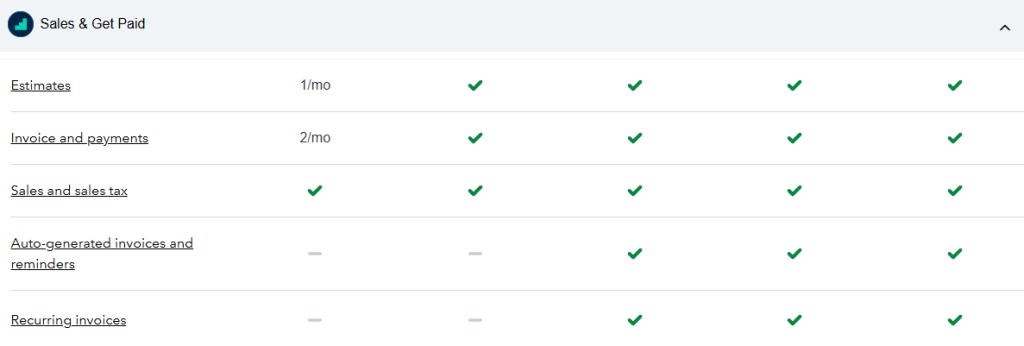
Invoicing is another major part of the QuickBooks platform. Businesses can create customised invoices and estimates, add branding and send documents directly to customers.
The invoicing tools also provide payment-status information, allowing users to see whether an invoice has been sent, viewed or paid. Automatic reminders can be configured for outstanding invoices, reducing the need to manually contact customers about every overdue payment.
Depending on the available plan and services selected, businesses can also accept payments through options such as cards and bank payments. This creates a connection between invoicing and the payment process rather than requiring separate systems for each stage.
Expense Management and Receipt Capture
Keeping track of business spending is an essential part of accurate bookkeeping. QuickBooks provides tools for organising expenses and keeping supporting information together.
Users can capture receipts using a mobile device and organise expenses within the accounting system. Bank feeds can also help bring transactions into the platform, where they can be reviewed and categorised.
This approach can be particularly useful for small businesses where the owner is responsible for both running the company and maintaining its financial records.
Tax and Financial Reporting
Tax preparation is another area covered by QuickBooks. Organised transaction and expense records can make it easier to understand the financial position of a business and prepare relevant information for tax-related work.
The platform also provides reports that can help users examine income, expenses, profitability and cash flow. More advanced plans offer additional reporting and business-management functionality.
Having these reports connected to the underlying accounting records means users can work from financial information that is continuously updated rather than relying exclusively on manually prepared spreadsheets.
Payroll and Workforce Management
For businesses with employees, QuickBooks also offers payroll solutions. In the UK, its payroll services are designed to support small and medium-sized businesses, including features for payroll processing, time tracking and workforce management.
The UK payroll offering is HMRC-recognised and can support direct submissions to HMRC and automatic tax-code updates. Depending on the payroll package, businesses can also access pension submissions, employee self-service tools and time-tracking functionality.
The connection between payroll and accounting is particularly useful because payroll information can be integrated with the wider financial records of a business.
What You Can Find on the Website
The QuickBooks website provides considerably more than product information. Visitors can compare plans, review features, learn about accounting practices and access educational resources covering different aspects of running a business.
There are dedicated sections covering invoicing, expenses, payroll, taxes, accounting, inventory, reporting and business management. The website also provides guides, tutorials, product demonstrations and information aimed at business owners and accounting professionals.
For new users, these resources can help explain how different features work before committing to a particular plan.
Mobile Tools for Businesses on the Move
The mobile side of QuickBooks extends several accounting functions beyond the desktop. Users can work with invoices, record expenses, capture receipts and monitor business information using compatible mobile devices.
This can be valuable for tradespeople, consultants, freelancers and other professionals who may spend much of their working day away from a traditional office.
Instead of waiting until the end of the day or week to enter receipts and transactions, users can record relevant information closer to the time it occurs.
Automation and Connected Business Tools
Automation is another important element of QuickBooks. Features such as automated invoice reminders, recurring invoices, bank feeds and transaction matching can reduce repetitive administrative work.
The platform has also expanded beyond traditional accounting functions, with connected tools covering areas such as payments, payroll, time tracking, projects, inventory and workforce management.
This wider ecosystem allows businesses to build more of their routine financial processes around a single platform instead of combining numerous unrelated applications.
What Makes the Platform Different
One of the clearest differences with QuickBooks is the breadth of functions available within the same ecosystem. Some financial software focuses primarily on bookkeeping, while other services concentrate on invoicing, payroll or expense management.
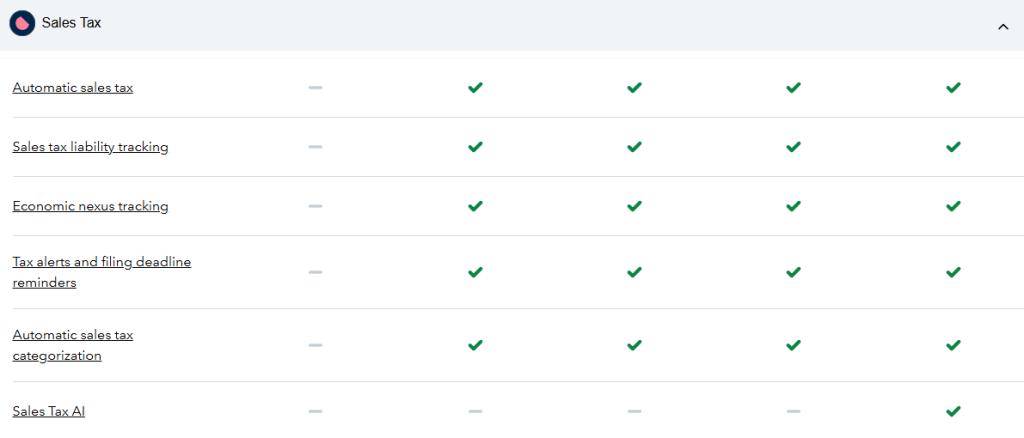
Here, these areas can be connected. An invoice can become part of the accounting records, payments can be matched to transactions, expenses can feed into financial reports and payroll can integrate with business accounts.
The availability of different plans also means businesses can choose functionality according to their requirements rather than having every feature presented as part of a single fixed package.
A Broad Financial Toolkit for Businesses
The appeal of QuickBooks comes from combining many financial tasks within one connected environment. From creating invoices and tracking expenses to managing payroll, monitoring cash flow and producing reports, the platform is designed to cover a wide portion of everyday financial administration.
Its cloud-based access, mobile tools, automation features and connected services add flexibility for businesses that want to reduce repetitive work and maintain clearer financial records.
For small businesses, growing companies and accounting professionals, QuickBooks provides a broad collection of accounting and business-management tools, making it possible to manage many of the financial processes that keep a company running from one central platform.