
DocHub is a powerful online document platform designed to simplify the way individuals and businesses edit, sign, share, and manage digital files. Over the years, it has evolved into a comprehensive solution trusted by professionals, educators, students, and companies that need reliable document workflows without complicated software. By operating entirely in the browser, DocHub removes the need for installations and constant updates, making document management faster and more accessible.
At its core, DocHub focuses on practicality and efficiency. Whether you need to quickly annotate a PDF, fill out official forms, collect legally binding signatures, or collaborate with a team, the platform provides everything in one streamlined interface. This convenience makes it particularly appealing for users who want professional results without technical complexity.

Comprehensive Editing and Annotation Tools

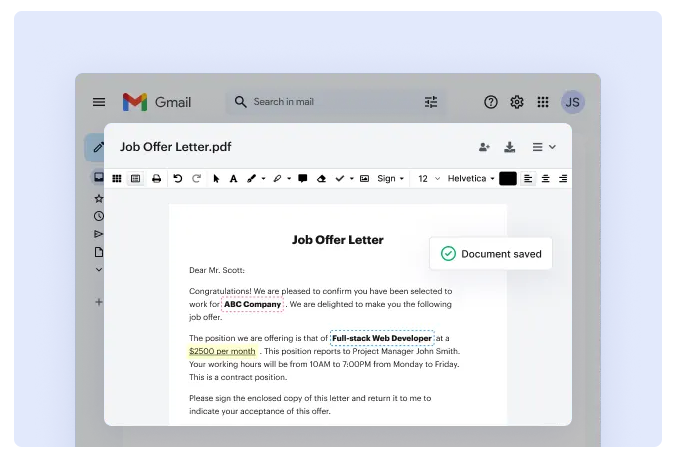
One of the strongest features of DocHub is its extensive set of editing tools. Users can upload documents directly from their device or connect through cloud storage services. Once uploaded, files can be edited with ease. You can add text, insert images, highlight important sections, draw shapes, redact sensitive information, and leave comments for others.
The ability to create fillable form fields such as text boxes, checkmarks, dropdown menus, and date selectors is especially valuable. Businesses that rely on standardized forms can transform static PDFs into interactive documents in minutes. Compared to many traditional PDF editors that require expensive subscriptions or advanced training, DocHub keeps the process simple and intuitive.
Reliable eSignature and Form Management
Digital signatures are a key part of modern document workflows, and DocHub delivers a secure and flexible solution. Users can create signatures by typing, drawing, or uploading an image of their handwritten signature. Documents can then be sent to others for signing, with options to set signing order and monitor progress in real time.
Beyond signatures, DocHub allows users to build reusable templates. This is particularly beneficial for organisations that regularly send contracts, agreements, onboarding paperwork, or permission forms. Instead of recreating documents repeatedly, teams can save templates and distribute them instantly, saving both time and effort.
Smooth Integration With Popular Cloud Services
Another factor that differentiates DocHub from many competitors is its seamless integration with widely used cloud platforms. Users can connect their accounts to services like Google Drive, Dropbox, OneDrive, and Gmail. This integration allows documents to be opened, edited, signed, and saved without switching between multiple platforms.
For teams that depend heavily on cloud storage and online collaboration, this integration creates a more efficient workflow. It eliminates the need to download files, edit them in separate programs, and reupload them afterward. With DocHub, everything happens within one connected environment.
Collaboration Features for Teams and Individuals
Collaboration is an essential part of modern work environments, and DocHub supports this with built in sharing and permission tools. Documents can be shared via email links or cloud access, and administrators can control who has viewing or editing rights.
Real time updates ensure that all collaborators are working on the most current version of a file. Comments and annotations make feedback clear and organised. This reduces confusion caused by multiple file versions being exchanged through email attachments, a common issue in traditional workflows.
Strong Security and Compliance Standards
Security plays a central role in document management, especially when handling confidential data. DocHub offers encrypted storage, password protection, detailed audit trails, and optional two factor authentication. These measures help protect sensitive information from unauthorized access.
For businesses operating in regulated industries, compliance is critical. DocHub aligns with major data protection and privacy standards, making it suitable for sectors such as healthcare, finance, education, and legal services. The combination of accessibility and security gives users confidence when managing important documents online.
Ease of Use Across Devices
One of the most appealing aspects of DocHub is its device compatibility. Since the platform works entirely in a browser, users can access their documents from desktops, laptops, tablets, or smartphones. There is no need for complicated installations or system specific software.
This flexibility supports remote work, travel, and hybrid office setups. Users can review and sign documents while away from their primary workspace, ensuring that important processes are never delayed. The interface remains clean and straightforward across devices, helping users stay productive wherever they are.
How It Differs From Other Brands
While many document platforms focus on highly specialized features or complex design tools, DocHub concentrates on everyday usability. It strikes a balance between powerful capabilities and a user friendly design. Instead of overwhelming users with advanced technical options that most people rarely need, it prioritizes the core functions that matter most such as editing, signing, sharing, and collaboration.
Another difference lies in accessibility. Many competing PDF editors require expensive desktop licenses or advanced software installations. In contrast, DocHub provides a cloud based alternative with flexible pricing options, including a free plan that allows users to test the platform before committing.
The platform also stands out through its integration ecosystem and team oriented features. By connecting directly with common cloud services and offering collaborative controls, DocHub supports modern digital workflows more effectively than many traditional solutions.
Why Professionals Choose DocHub
Professionals choose DocHub because it simplifies document handling without sacrificing functionality. From freelancers managing client contracts to large teams coordinating internal paperwork, the platform adapts to various needs. Its combination of editing precision, signature management, cloud compatibility, and secure infrastructure makes it suitable for both personal and professional use.
In a digital landscape where speed and reliability are crucial, DocHub provides a practical and efficient way to manage documents from start to finish. By combining powerful tools with ease of access, it continues to position itself as a dependable solution for anyone looking to streamline document workflows.