PDF Expert is a powerful and versatile PDF editing solution designed to help individuals and professionals manage their PDF documents with ease. As digital workflows become more central to everyday work and study, having a reliable tool for handling PDFs is essential. This brand has earned a strong reputation for combining rich functionality with an intuitive interface that makes complex tasks feel effortless. Whether you’re annotating a contract, filling out forms, or reorganising pages, PDF Expert provides the tools necessary to get the job done quickly and accurately.
What sets PDF Expert apart from many other PDF editors is how fluid and natural the experience feels across different devices. Designed with productivity in mind, it appeals to a wide range of users—from students and freelancers to executives and legal professionals.
Powerful Editing and Annotation Tools

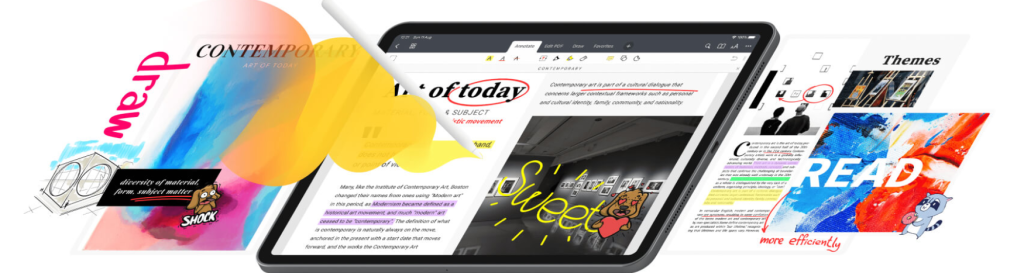
One of the standout features of PDF Expert is its robust editing and annotation capabilities. Users can easily highlight text, add notes, shapes, and stamps, and use freehand drawing tools to mark up documents. This makes collaboration smoother, as users can visually communicate changes and feedback directly within the file.
Beyond basic annotations, the platform allows users to edit text and images directly within a PDF. Whether you need to correct a typo, update contact details, or replace a logo, the editing tools are responsive and simple to use. This level of control is particularly helpful for professionals who regularly work with contracts, proposals, and reports.
Advanced Features for Document Management
In addition to core editing tools, PDF Expert offers a range of features that elevate it above many standard PDF solutions. Users can merge multiple PDF files into one, split a large document into smaller parts, and rearrange individual pages with drag‑and‑drop ease. These organisational tools save time and help maintain neat, professional documents.
Filling out PDF forms is also seamless. The platform recognises interactive fields, allowing users to type directly into text boxes, select options, and even sign forms digitally. Instead of printing and scanning paperwork, users can complete everything on their device in minutes.
Digital Signatures and Security Tools
For users who need to sign and secure documents, PDF Expert offers built‑in digital signature capabilities. Users can create custom signatures, apply them to documents, and send files for signature, making it easy to handle agreements and approvals directly within the app.
Security features such as password protection and redaction ensure that sensitive information remains private. With password encryption, documents can be locked so that only authorised individuals can view or edit them. Redaction tools allow users to permanently remove confidential text and graphics.
Cross‑Platform Compatibility and Syncing
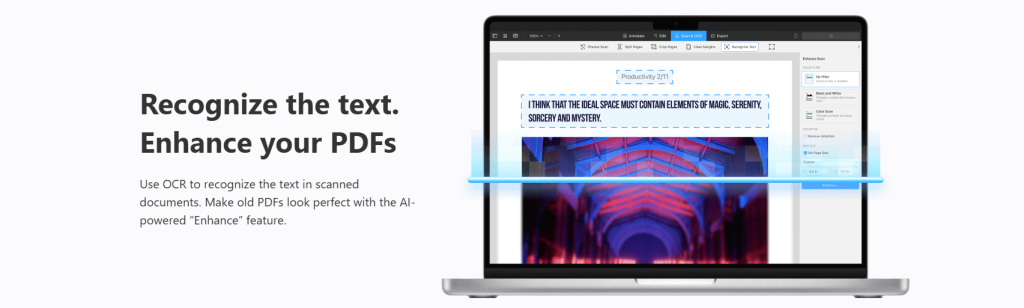
An important advantage of PDF Expert is its cross‑platform compatibility. The service is available on macOS, iOS, and other devices, allowing users to work seamlessly across their favourite platforms. Changes made on one device sync to connected devices, ensuring that documents are updated and accessible wherever you go.
Integration with cloud storage services such as iCloud, Dropbox, Google Drive, and OneDrive further enhances flexibility. Users can open and save PDFs stored in the cloud without manually importing or exporting files. This streamlines workflows and makes collaboration with colleagues or clients more efficient.
User‑Friendly Interface Designed for Productivity
Even with its wide range of features, PDF Expert remains user‑friendly. The interface is clean, responsive, and thoughtfully designed so that tools are easy to find and use. Whether you’re a frequent PDF editor or a newcomer handling documents occasionally, navigating the platform feels natural.
Users often find that the learning curve is gentle compared to more complex PDF software. This accessibility makes the product suitable for people with varying technical skills, from students preparing coursework to professionals managing large document volumes.
What You Can Find on Their Website
On the official website of PDF Expert, visitors will find detailed information about all available features and use cases. The site includes clear descriptions of editing tools, security functions, and productivity enhancements. Prospective users can also view screenshots and tutorials that help demonstrate how different capabilities work in real‑world scenarios.
In addition to product information, the website offers resources such as user guides, FAQs, and support channels for troubleshooting or learning advanced techniques. Pricing details are presented clearly, allowing users to compare plans and choose the option that fits their needs. Whether you’re evaluating the tool for personal use or for an entire team, the website provides comprehensive information to support your decision.
How This Brand Differs From Other PDF Solutions
What sets PDF Expert apart from many competitors is the balance it strikes between powerful functionality and ease of use. Some PDF tools are feature‑rich but overly complex, requiring users to navigate confusing menus and technical settings. Others are simple but lack depth, failing to offer the tools needed for real professional work.
PDF Expert hits a middle ground by offering advanced capabilities without overwhelming users. The result is a solution that handles everyday editing tasks as well as complex document workflows. From annotation and text editing to page management and security, the platform provides a full suite of tools that meet professional standards while remaining accessible.
Another key differentiator is its seamless performance across devices. Many PDF solutions struggle with consistency when switching between desktop and mobile environments. PDF Expert ensures that users have a unified experience, with responsive design and synced changes across platforms.
Why Users Choose This PDF Editor
Users choose PDF Expert because it delivers an efficient, reliable, and complete PDF solution. Whether you are a student managing research papers, a freelancer preparing proposals, or a business professional negotiating contracts, this tool provides the flexibility and precision needed for productive document work.
The combination of powerful editing tools, organisational features, digital signatures, and security options makes it a standout choice for anyone who regularly interacts with PDFs. With a friendly interface and strong cross‑platform support, PDF Expert continues to be a preferred PDF editor for users who want performance without complexity.