
Working with digital documents often involves more than simply opening and reading a PDF. Businesses, freelancers, educators and individuals may need to edit text, complete forms, collect signatures, organize pages and share finished files. dochub brings many of these tasks together in one browser-based platform, with tools designed to simplify the way documents are prepared and completed.
The service combines PDF editing, annotation, electronic signatures, forms, templates, document storage and collaboration. It can therefore be used for simple personal documents as well as more structured business workflows.
Powerful PDF Editing Tools

One of the central features of dochub is its online PDF editor. Users can add or modify text, insert images, draw directly on pages and add annotations without needing to print a document first.
The editing toolkit includes highlighting, underlining, strikethrough, comments, shapes, stamps and freehand drawing. There are also tools for whiteout and redaction, which can be useful when information needs to be covered or removed from a document.
Page management is another important part of the platform. Users can rearrange, rotate, delete and add pages, as well as merge documents together. This makes the service useful not only for editing individual pages but also for preparing complete document packages.
Electronic Signatures and Signature Requests
Electronic signatures are another major part of the dochub experience. Users can create signatures by typing, drawing or uploading an image, then place them directly into documents.
The platform also supports sending documents to other people for signatures. Users can specify where signatures or initials are required and track the progress of documents as recipients complete them.
This can simplify processes that traditionally involved printing contracts, signing paper copies, scanning them and sending them back. For organizations handling agreements, applications or approvals, having editing and signing tools within the same workflow can reduce the number of separate services required.
Fillable Forms and Reusable Templates
dochub also provides tools for transforming static documents into interactive forms. Users can add text fields, paragraph fields, checkboxes, dropdown menus, date fields, signature areas and initials fields.
Fields can be assigned to specific roles, making it possible to prepare a document that needs information from multiple people. Required fields can also be configured to ensure that important information is provided.
Templates take this concept further. Once a document has been prepared, it can be reused rather than recreated from scratch every time. This can be particularly useful for businesses that regularly distribute contracts, applications, questionnaires, agreements or other standardized paperwork.
Working With Documents From Different Sources
Another practical feature of dochub is its support for cloud-based document sources. Users can import documents from services such as Google Drive, Dropbox, OneDrive and Box, as well as work with documents from Google-related applications.
This reduces the need to download files to a computer before beginning an editing session. A document can instead be brought into the workflow from an existing cloud-storage location, edited and then exported or saved as needed.
The platform also supports a range of common file formats, making it useful when documents arrive in different forms rather than exclusively as PDFs.
A Browser-Based Workflow
A significant difference between dochub and traditional desktop document software is its browser-based approach. Users can access the service without installing a large desktop application, making it suitable for people who work across different computers or locations.
The platform also provides mobile functionality, allowing essential document tasks to be handled from mobile devices. This can be convenient for professionals who need to review, complete or sign documents while away from their main workstation.
What You Can Find on the Website
The dochub website provides information about its different document tools, including PDF editing, forms, templates, eSignatures, document management and collaboration.
Visitors can also find dedicated tools for converting files to PDF, splitting and merging documents, rotating and reordering pages, adding fillable fields and protecting documents. The platform includes search functionality, document organization tools and options for downloading, printing and exporting finished files.
There is also a help center containing guides for tasks such as uploading documents, editing PDFs, creating forms, sending signature requests and managing documents.
AI-Assisted Document Features
dochub has also incorporated AI-powered functionality into its document workflow. Available features include tools designed to simplify documents, summarize key points and answer questions about document content.
These capabilities can be useful when working with lengthy files. Instead of manually searching through every page, users can use AI-assisted tools to help identify relevant information and understand the contents of a document.
The combination of conventional PDF tools and AI features gives the platform a broader role than a basic PDF editor.
Security and Document Management
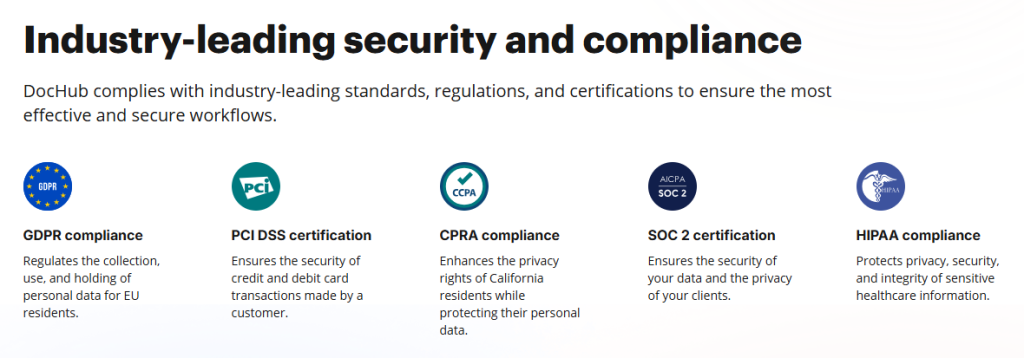
Handling sensitive documents requires more than editing and signing capabilities. dochub provides cloud document storage and security features intended to help users manage files after they have been uploaded.
The service highlights encrypted storage, secure connections and authentication features, while business-oriented plans provide additional organizational and document-management capabilities. Audit trails and other controls can also be relevant for teams that need visibility into document activity.
Useful for Individuals and Teams
The flexibility of dochub makes it suitable for a wide range of users. Individuals can use it to fill out forms, sign documents or make quick PDF changes, while freelancers and small businesses can use templates and signature requests for recurring administrative tasks.
Larger teams can use shared document workflows and organizational tools to coordinate documents between multiple people. Educational users can also benefit from forms, assignments and document-sharing capabilities.
What Sets the Platform Apart
The main distinction of dochub is the breadth of functions available within one document workflow. Instead of concentrating only on PDF editing or only on electronic signatures, it combines editing, forms, templates, signing, sharing, storage and document management.
Its integration with major cloud-storage and productivity services further reduces friction when moving documents between different applications. The browser-based design also makes the tools accessible without depending on a traditional desktop workflow.
A Flexible Solution for Modern Documents
For anyone who regularly handles digital paperwork, dochub provides a broad collection of tools for completing documents from start to finish. Users can upload a file, edit its contents, add annotations or form fields, request signatures, collaborate with others and export the completed document.
With reusable templates, cloud integrations, mobile access and AI-assisted features added to its core PDF functionality, the platform offers a practical way to bring many everyday document tasks into one place.