
In a world where home design tools are growing in number, LiveHome3D has made a strong name for itself by combining powerful features with accessibility for users of all skill levels. Whether you are planning a renovation, sketching a dream home from scratch, or simply enjoying the joy of creating spaces, the products offered by LiveHome3D bring creativity and practicality together in a compelling way. This article explains what is special about LiveHome3D, what you can find on its website, and how it differs from other brands in the design software space.
What You Can Do with LiveHome3D
The core strength of LiveHome3D is its ability to let users visualize home layouts in both two and three dimensions. Many design tools focus purely on technical drafting or limit users to flat floor plans. LiveHome3D blends both approaches, giving people a chance to build detailed plans and then instantly shift into a 3D view to see how spaces will feel in real life.

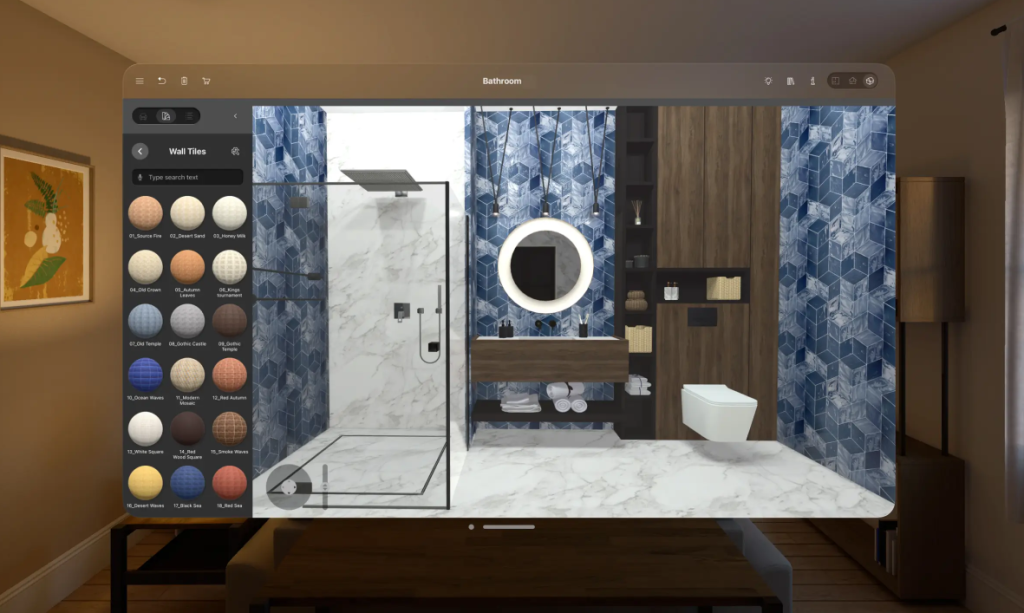
Users of LiveHome3D can:
- Create detailed floor plans with accurate measurements
- Add doors, windows, furniture, and fixtures easily
- Visualize designs in photorealistic 3D perspective
- Customize textures, materials, and lighting
- Walk through designs as if inside a finished space
This combination of ease and depth makes the software a favorite among both casual designers and professionals.
What You Will Find on the LiveHome3D Website
When you visit the website for LiveHome3D, you will see a well-organized presentation of everything the product offers. The homepage clearly lays out key features and benefits, helping visitors quickly understand how the software works and whether it matches their needs. Product pages offer detailed descriptions, screenshots, and examples of designs created with the software.
On the LiveHome3D site, you can also find:
- Pricing and licensing details for different versions
- A comparison of features across platforms
- Tutorials and user guides to get started
- Videos showing design workflows and tools in action
- Support resources for troubleshooting and questions
The combination of visuals and clear explanations makes learning about the product straightforward, even for first-time visitors.
How LiveHome3D Works for You
One of the reasons people enjoy using LiveHome3D is that it balances usability with powerful design capabilities. Unlike some programs that assume advanced technical knowledge, LiveHome3D presents tools in an intuitive way that helps beginners get started quickly. At the same time, the software’s depth supports detailed work that experienced designers appreciate.
For example, adding furniture and décor is as simple as dragging and dropping items into the plan. Adjusting dimensions or changing materials takes only a few clicks. Then you can instantly switch to a 3D view to see how your choices affect the space’s look and feel. This fluid transition between views helps users experiment and refine designs without frustration.
Where LiveHome3D Stands Apart from Other Brands
Compared to other home design tools, LiveHome3D stands out in several meaningful ways:
Balanced Ease of Use and Capability
Many tools are either too basic to be useful for real design work or too complex for casual users to enjoy. LiveHome3D hits a middle ground that makes it both welcoming and powerful.
Seamless Transition Between 2D and 3D Views
While some competitors make users work heavily in one mode or the other, LiveHome3D lets people move seamlessly between detailed floor plan editing and immersive 3D visualization. This approach helps users understand their projects more fully.
Cross-Platform Availability
Whether you use a desktop, laptop, or tablet, LiveHome3D offers versions that fit your workflow. This flexibility means people can work on designs at home or on the go.
Realistic Rendering and Walkthroughs
While some software only offers basic 3D previews, LiveHome3D includes high-quality rendering tools that produce photorealistic visuals. You can also walk through your designs as if walking inside the space itself, which brings plans to life in a way flat images cannot.
Why Users Choose LiveHome3D
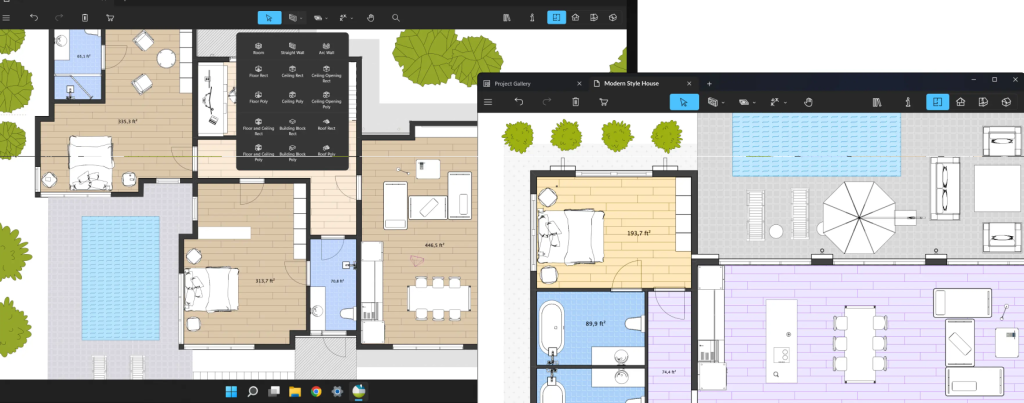
People who choose LiveHome3D often cite its combination of clarity and control. Whether designing a small room or planning an entire house, users appreciate how the software makes complex decisions feel manageable. The ability to visualize elements like lighting, textures, and spatial relationships adds confidence that the final results will match expectations.
Beyond planning personal projects, many people find that LiveHome3D supports collaboration with builders, architects, and clients. Sharing clear visuals and walk-throughs helps communicate ideas more effectively than traditional blueprints alone.
Final Thoughts on LiveHome3D in the Design Software Landscape
As home design becomes more accessible to everyday users, standing out requires a product that combines practicality with a delightful experience. LiveHome3D has established itself as a name that delivers on both fronts. The software offers enough depth for serious design work without overwhelming users with unnecessary complexity.
On the LiveHome3D website, visitors can find everything they need to understand the tools, see examples, and begin creating with confidence. Compared to other brands that may focus too narrowly on advanced professionals or too lightly on basic hobbyists, LiveHome3D brings together usability, power, and visual clarity in a way that resonates with a wide range of users. Whether you are sketching your first floor plan or fine-tuning a detailed home renovation, LiveHome3D helps bring your design ideas to life.